Getting started

From one spreadsheet to a real database.

Six things people actually do with Datera, in the order they usually do them. Each one is a few minutes, and none of them changes the files you already have.

1 · Install it

Download it, open it, and that is the whole setup. There is no account, no sign-in, and no project to create.

First launch fetches two things once: the database extensions that read spreadsheets, and — if you want it — a model. After that it runs with the network off entirely.

2 · Ask one spreadsheet a question

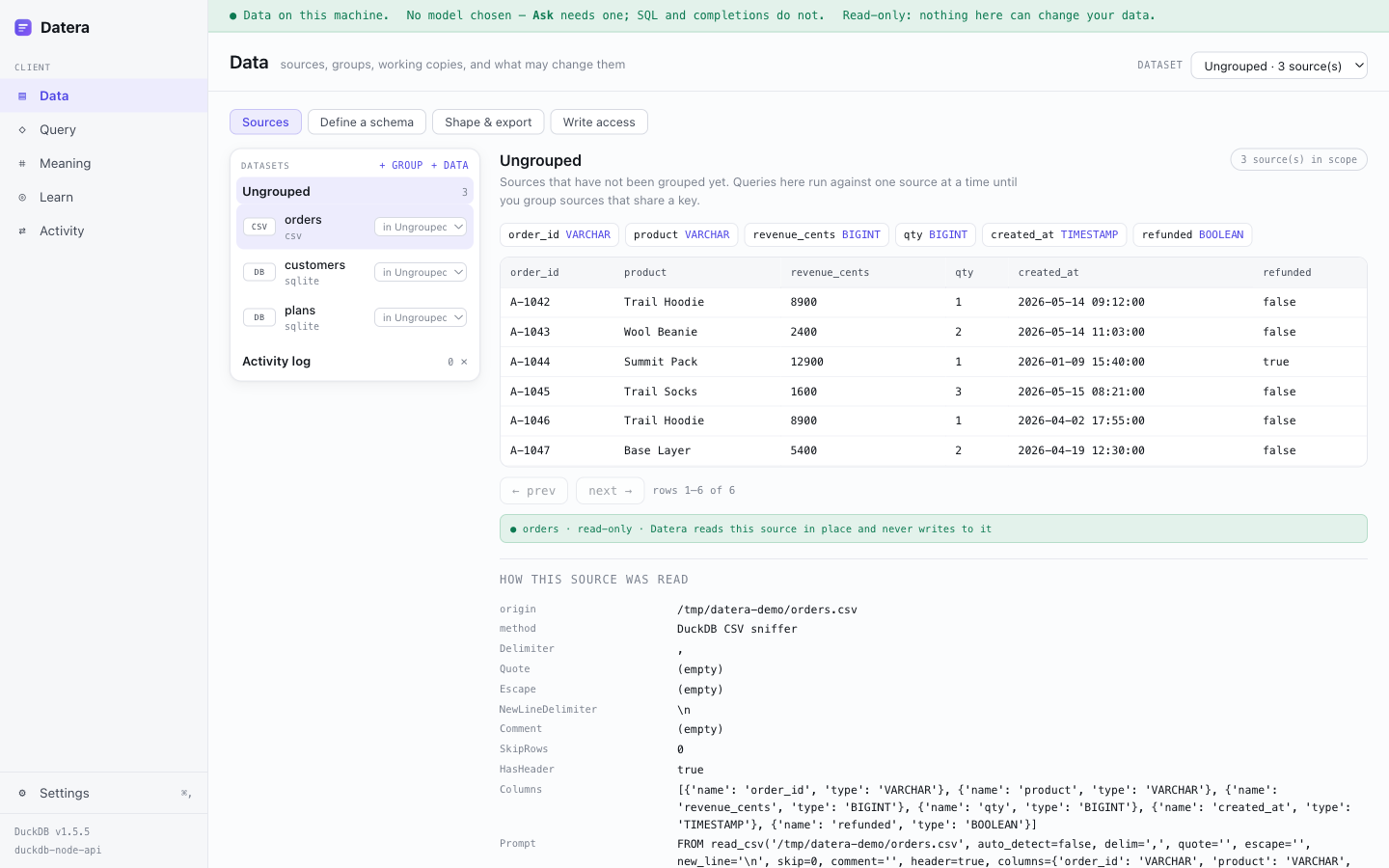
The shortest useful thing Datera does. Data → + DATA, pick a CSV or an Excel file, and it appears with its columns typed and its rows there to look at.

A CSV and a SQLite database connected in Datera, showing typed columns, a preview of the rows, and a panel explaining how the file was parsed.
Nothing was uploaded and nothing was copied. Datera reads the file where it sits, and How this source was read shows the delimiter it detected, whether it found a header, and the exact query it used — so a misread export is something you can see rather than something you find out from a wrong answer later.

Then go to Query and ask in plain English, or write SQL. Both take the same path through the same engine and the same read-only guard.

3 · Join several spreadsheets that share a column

This is the one worth knowing about. If you have three exports — orders, customers, products — that share an id, Datera can treat them as one database and let you query across them.

01

Connect each file

All three as separate sources. They start ungrouped, which means each is queried on its own.

02

Group them

+ GROUP makes a dataset, then move the related files into it. A dataset is the boundary a query can see.

03

Let it find the keys

Datera looks for columns that line up — customer_id in orders matching id in customers — and proposes the link.

04

Confirm the links

You approve or reject each one. Only confirmed relationships are given to the model, because a guess is not a fact.

After that, SELECT … FROM orders JOIN customers ON … works, and a question like “which customers spent the most last quarter?” can be answered across files that were three separate spreadsheets ten minutes ago. Your original files are untouched throughout — the joins live in Datera’s own workspace, not in your documents.

Grouping is also a boundary, not just a convenience.

A query can only see the dataset it was asked against. Files you have not grouped together cannot be joined by accident, and an AI agent given access to one dataset cannot reach another. That is enforced in the engine, not by asking the model nicely.

4 · Turn a flat export into real tables

The other direction: one wide sheet where every row repeats the customer name, the address and the product description. Datera spots the repetition and proposes splitting it into proper tables with keys.

You edit the proposal before anything happens, and the result is a copy — the sheet you started with is never modified. It is also the clearest way to see what normalisation actually means, which is why this is the part that tends to get used in teaching.

5 · Connect Postgres, MySQL or SQLite

Not everything is a file. Datera connects to a live database and treats it exactly like any other source — same queries, same trace, same read-only guarantee.

6 · Choose the model

SQL, the schema map and completions need no model at all. Asking in plain English needs one, and there are three ways to get there.

The bundled one

Open weights, Apache-2.0, sized to your machine. No key, no account. Downloaded once, then it works offline.

One you already run

Ollama, LM Studio, or any OpenAI-compatible endpoint. Datera detects what is running and offers it.

Your own API key

Anthropic or OpenAI, billed to your account, called directly. Datera is not in the middle and takes no cut.

Embeddings are a separate choice and stay local by default, even when chat is remote. One combined setting is how a tool ends up sending every text column you own to a remote service without anyone deciding to. Whatever runs, the trace names it and shows the cost — which is $0 for anything local.

7 · Serve it to an AI agent

Once your data makes sense, Datera can expose it over MCP so Claude Code, Cursor or any MCP-speaking agent can ask it questions — under the same read-only guard, with every request traced.

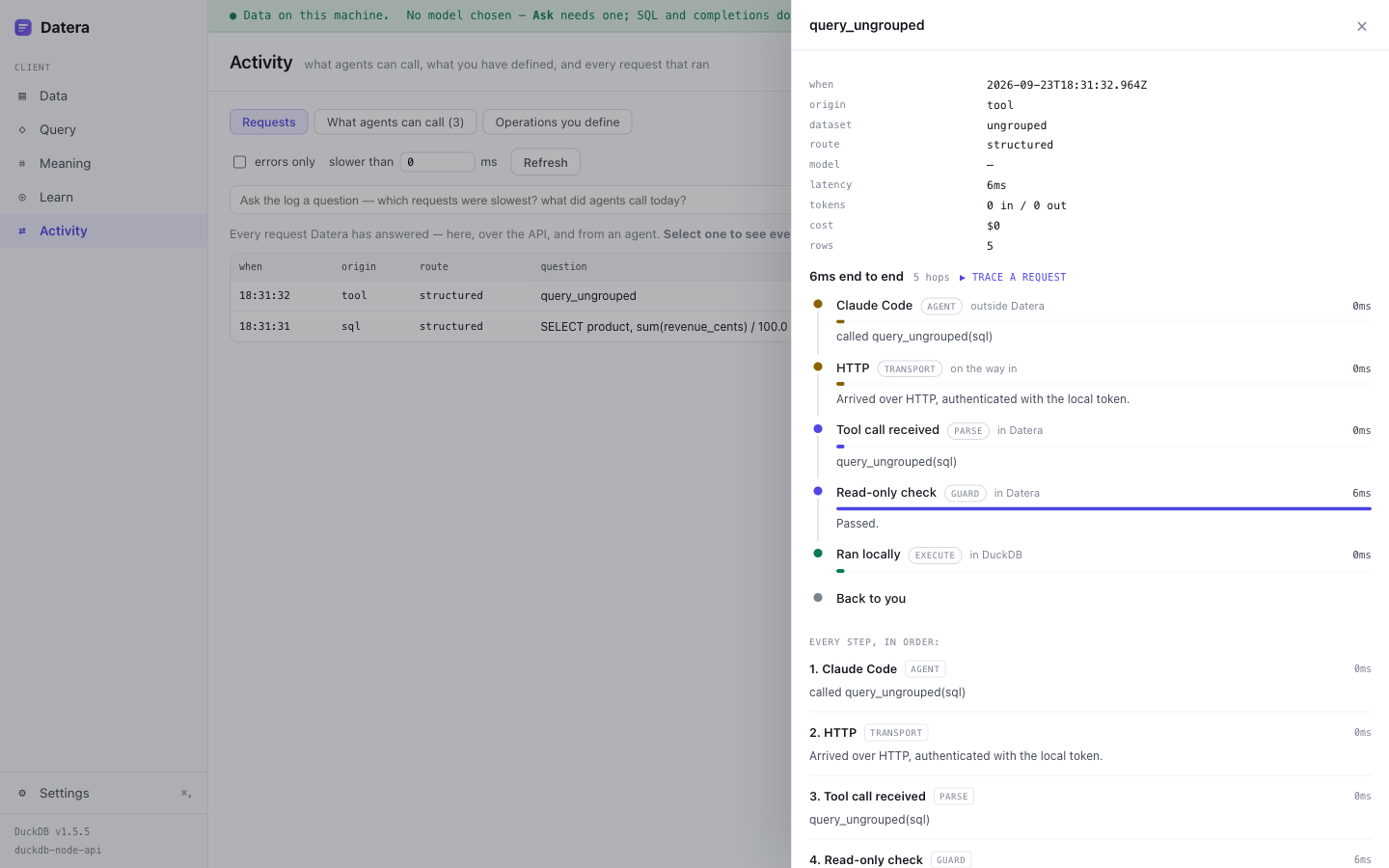
Datera's request trace showing an agent call travelling through five hops: the agent, the HTTP transport, the tool call, the read-only check, and the query running in DuckDB.
A real request from an agent, hop by hop: who called, how it arrived, what was checked, where it ran, and what it cost. Agents get tools generated from the datasets that exist — a search tool appears only where something is embedded, and a write tool only where you have granted one, so nothing is advertised that would fail when called.

Questions

Does my data get uploaded anywhere?

No. Files are read on your machine and queries run there. If you choose a remote model, the schema — table and column names, and any meanings you have confirmed — is sent so it can write SQL. Your rows are not. You can see exactly what was sent, on every answer, in the trace.

Can Datera change or damage my files?

No. Sources are opened read-only and that is enforced twice: a guard that checks every statement with the database’s own parser, and a read-only flag on the connection itself. Writes are only ever possible on a derived copy, and only after you explicitly grant it, preview the exact rows, and confirm.

How big can a file be?

Datera runs DuckDB, which is built for files far larger than memory. A multi-gigabyte Parquet file or CSV is ordinary. The practical limit is your disk, not the tool.

Do I need to know SQL?

No — ask in English. But Datera always shows the SQL it wrote, which is a good way to end up knowing some. That is deliberate: the teaching value is the product, not a side effect.

What formats can it read?

CSV, TSV, Excel (.xlsx), JSON, Parquet and SQLite as files; Postgres and MySQL as live connections. Excel workbooks with several sheets let you pick which ones to bring in.

What happens if I stop using Datera?

Nothing you made is stranded. Export gives you the data as Parquet or CSV, with the schema, the dictionary and the dataset definition beside it, in open formats. The test suite includes exporting and re-importing into a clean instance, so “no lock-in” is checked rather than claimed.

Is it really free?

The desktop client is free and open source under Apache-2.0, permanently. If you use your own API key, that bill is between you and your provider. Datera Server — for exposing data to other people — is a separate paid product, and is not finished yet.

Something is wrong, or I am stuck. Who do I tell?

Open an issue for a bug, start a discussion for a question, or email support@prodxp.com if you would rather not do it in public. Datera is built by one person in the open, and “this made no sense to me” is the most useful report there is.

Can I use it without any AI at all?

Yes. SQL, the schema map, completions, grouping, joins, normalisation and export all work with no model configured. The model is for asking in English; nothing else depends on it.